Shopping flow
Back to Flights home.
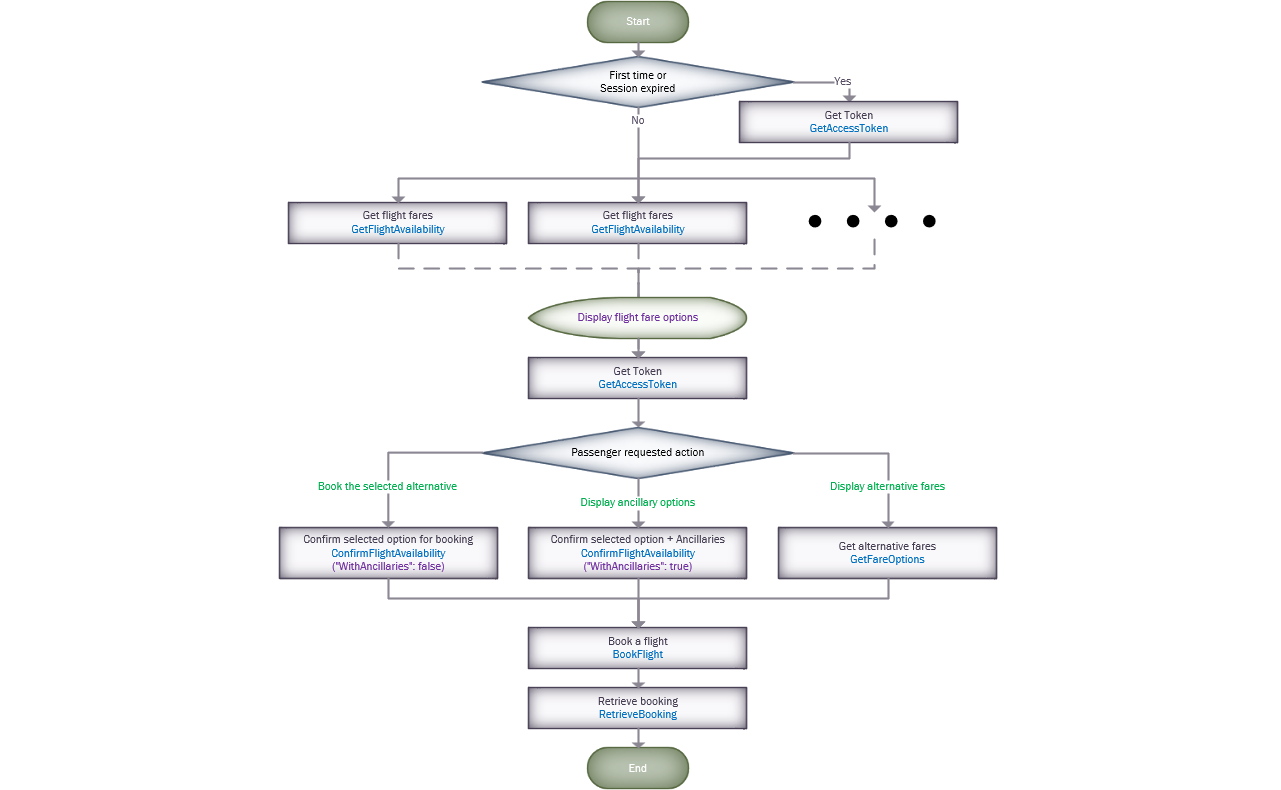
The following diagram describes how to implement the shopping transactions.
GetAccessToken
The transaction returns a token that should be provided in all the transactions.
As explained into the diagram, the token should be stored and re used in multiple GetFlightAvailability transactions. Request a new one when receives a 1210 (Session expired) error code. After displaying the flight fare alternatives into the web page, when the passenger requests an action (book, get ancillaries or get the alternative fares), we recommend to request a new token to validate that it is still available. This token should be stored for being re used in GetFlightAvailability requests.
The token has a variable lifetime, so we recommend to implement it as we previously described.
For more information, see the GetAccessToken section.
Search for flight fares
The GetFlightAvailability transaction returns a combination of the cheapest flight fares options in a normalized way. This transaction performs the flight fare confirmation in the same process and returns a list of alternative fares, if available. You can then book your flight using the selected fare code.
We recommend not to implement a system that automatically requests several GetFlightAvailability just to storing information, send a request when receives a request from the end user.
Usually, the provider has to implements Cache to support the multiple requests, which becomes in an increase of SellFailures (UC) at the BookingFlight (1507) time.
For more information, see the GetFlightAvailability section.
Brands and baggage information
This information could be provided into each returned alternative (from GetFlightAvailability response) o when the user selects the required option (ConfirmFlightAvailability - GetFareOptions)
For more information, see the Brands and Baggage information section.
Passenger requested action
In case you that you want to provide Ancillaries and/or Alternative Fare Options information. We recommend to implement a button for each action because some providers could have issues when receive multiple price transactions. The diagram illustrates the “Passenger requested action” actions.
For more information about Book the selected alternative or Display ancillary options, see the ConfirmFlightAvailability section.
For more information about Display alternative fares, see the GetFareOptions section.
Book a flight
The previous ConfirmFlightAvailability/GetFareOptions transaction returns the required information to build the BookFlight request. We recommend to copy the entired object and update it with passengers, buyer, form of payment (optional) information.
For more information, see the BookFlight section.
Retrieve booking
You can retrieve an already booked flight, using this transaction, to validate the status of your booking.
For more information, see the RetrieveBooking section.
Back to Flights home.