Ticketing flow
Back to Flights home.
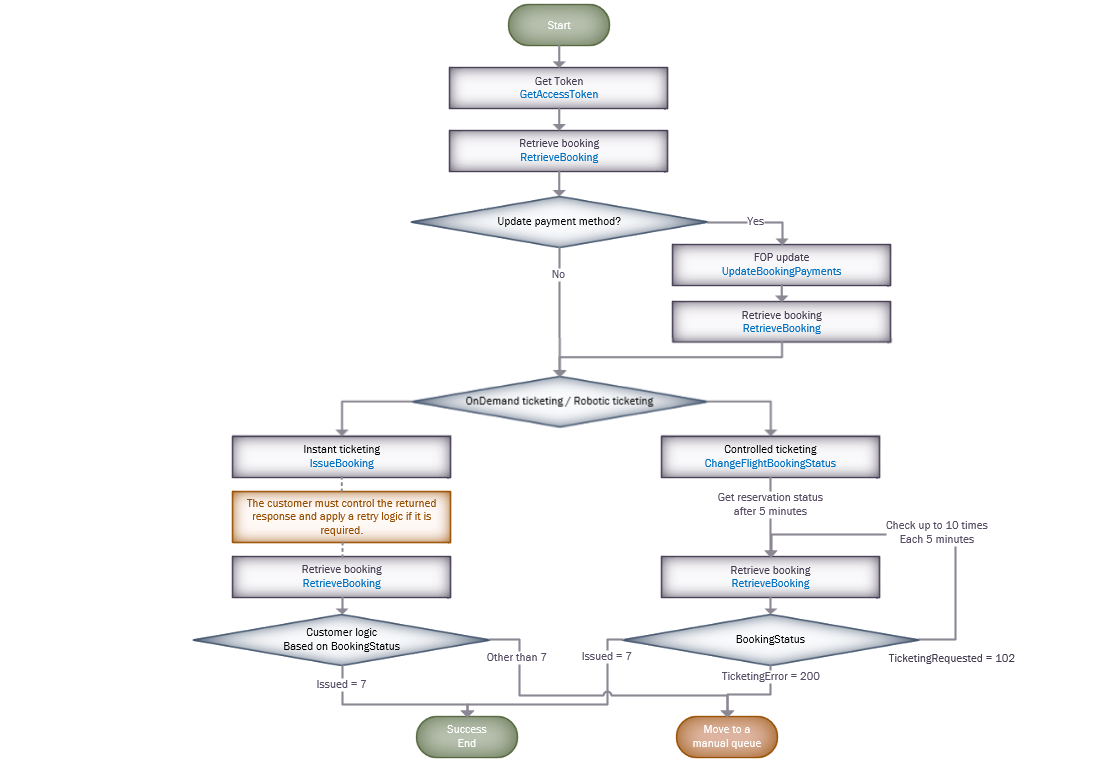
The following diagram describes how to implement the ticketing services.
GetAccessToken
Before starting the ticketing process, we recommend to request the token.
For more information, see the GetAccessToken section.
Retrieve booking
Implement the RetrieveBooking service in any place of the flow you need to validate the reservation status (itinerary, form of payment, tickets, etc).
For more information, see the RetrieveBooking section.
Form of payment
We recommend to validate de current reservation FOP, if you want to update this information, you can do that through the UpdateBookingPayments service.
For more information, see the UpdateBookingPayments section.
Issue ticket
We offer two alternatives for ticketing process:
- Robotic ticketing:
- You will add the reservation to our IssueTicket List (changing the booking status).
- We have a retry logic based on each provider knowledge.
- We run this robotic functionality each 5 minutes.
- The maximum times we can retry with a reservation is 10.
- Ticketing on demand:
- This is a standard issue ticket transaction, that returns the provider response (success or error) without applying any logic from our side.
- You must control the returned response, applying a retry or the desired logic.
- The response time could spend between 35 and 90 seconds.
Ticketing validation: After ticketing request, we recommend to validate the BookingStatus of RetrieveBooking transaction response.
- If "BookingStatus" == 7 –> The reservation is correctly issued.
- If the reservation contains tickets, it is because the provider correctly returned the information.
- If the reservation does not contain tickets, it is because the provider did not return the ticket numbers, but informed that the reservation is issued.
In both scenarios, if the tickets couldn't be successfully generated, you must take action of the reservation base on your logic.
For more information about Robotic ticketing, see the ChangeFlightBookingStatus section.
For more information about Ticketing on demand:, see the IssueBooking section.
Back to Flights home.